







After conducting the CSIR NET Exam, National Testing Agency releases the Provisional Answer Key.
With CSIR NET Provisional Answer Key, NTA provides a chance to all the aspirants to raise an objection and challenge the Answer Key.
If you’re one of those students who think that the official CSIR NET 2025 Answer Keys is not appropriate and can be improvised, do read the blog to know the procedure of answer key challenge & raise your objection.
Here you can check what we have covered in this blog -
How to Challenge CSIR NET Answer Key
How to Challenge CSIR NET Dec 2025 Answer Key
After successfull completion of CSIR NET Exam, the exam authority (NTA) releases the Answers submitted by the candidates and Question paper. If you found any challenge you may submit it along with proof at official website.
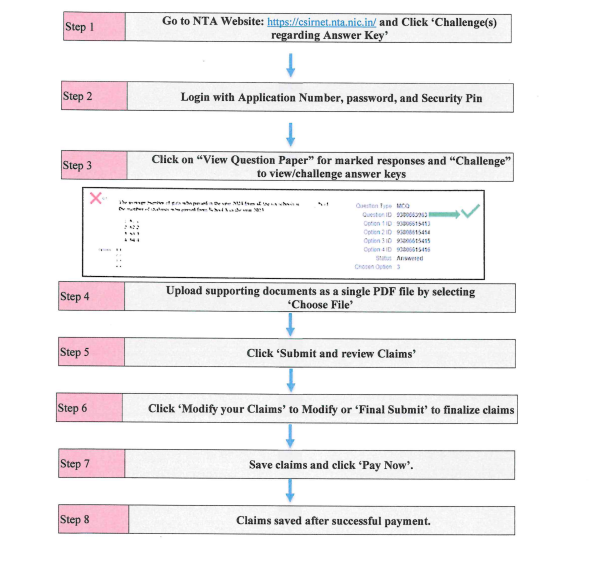
Below we have provided the step by step process that will help you to submit the challenge.
Step 1 – Please go to the website https://csirnet.nta.nic.in/.
Step 2 – Click 'Challenge (s) regarding Answer Key'.
Step 3 – Login with your Application Number and password and enter captcha as displayed and submit.
Step 4 – Click on "View Question Paper" for viewing the marked/recorded responses and to view or challenge the Answer Keys click on the link "Click to view/Challenge Answer Key".
Step 5 – The Question IDs in the Answer Key list are not presented in sequential order. Candidates are advised to refer to the Question Paper and match the corresponding Question IDs to those listed in Answer Key
Step 6 – You will see Question ID in sequential Order:
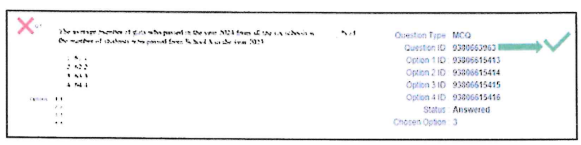
Step 7 – The ID next to the question under the column 'Correct Option(s)' stands for the correct Answer Key to the Question.
Step 8 – If you wish to challenge this option, you may use any one or more of the Option IDs given in the next four columns by clicking the check box.
Note – All the documents should be uploaded only in PDF format.
Step 9 – You may upload supporting documents in which you can select 'Choose File' and upload (all documents to be put in a single pdf file).
Step 10 – After clicking your desired option, scroll down, 'Submit and review Claims' and move to the next screen.
Step 11 – You will see a display of all the Option IDs you have challenged.
Step 12 – Click on 'Modify your Claims' in case you wish to modify the claims OR 'Final Submit'.
Step 13 – After saving the Claims, you will find a screen displaying your challenges.
Step 14 – Kindly pay the fee by clicking on 'Pay Now'. The claims will be saved finally after successful payment of requisite fee.
Step 15 – Select mode of payment and pay your fee @ Rs. 200/- for each question challenged. Make payment through Debit/Credit Card/Net Banking/UPI.
Step 16 –In case of any difficulty, please contact on 011-40759000 or write an e-mail to csirnet@nta.ac.i
Download CSIR NET 2025 Model Paper for Free
Important Instructions for Fee Payment
Here are some important instructions regarding fee payment. Candidates are suggested to read them carefully before challenging the CSIR NET Answer Key.
Candidates will have to pay INR 200 to challenge each question.
If the challenge is found correct, the fee will be refunded in the same account.
The payment can be made through Debit Card/Credit Card/Net Banking.
The complete process to challenge the answer key is discussed above. After making improvements based on candidtae's objections, CSIR NET Results is declared after around 15 days.
Hope this blog would help you to get enough knowledge about how to raise an objection against CSIR NET Answer Key.
Still, if anyone of you have any query regarding the process that we shared above, please ask us in the comments box below.